| Sci-fi illustration | Surreal | Abstract | Texture | Misc |
 |
 |
 |
 |
 |
| Abstract | 1 | 2 | 3 | 4 | 5 | 6 | 7 |
◀ back TIP next ▶

Mekanika
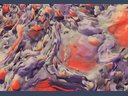
Creation year: 2011 Medium: digital Dimensions: 6800 x 5100 px
|
When I first started doing digital abstract images I did all my work in 2D. Later I started incorporating different elements like objects which I rendered in 3D. The main advantage of using 3D tools is that they enable one to render an object from any angle. It's also easy to manipulate the object in almost countless ways. Now I often rely on both methods to create abstract images. I often start by looking through my large library of unused and half finished images which I created over the years to see if there is anything that will give me some ideas. I almost always find something suitable and start working on it. Whenever I render something in 3D that looks good but is not suitable for what I'm working on at the moment, I'll save it for future use. That is how my library got so large. Over time I got I good sense for what will work where and how to do it. So I get the ideas pretty quickly as I browse through the images. My favorite method is to combine both 2D and 3D abstract images in such a way that makes the final image unique and original. Just like in Mekanika where in the foreground there is an object merged with a background. |
(comments are closed)
@Guvnah Thank you, glad to hear you like it :)
Hello Dawid. Congradulations on the new monitor. I can see you are putting it to great use this new piece! The colors and the sense of still motion is wonderful. Really beautiful. |

Art and illustration studio
of Dawid Michalczyk.
| Subscribe: |
by email or RSS Feed.
| Follow me on: |


| New in gallery: |

